

Unlocking the Full Power of Stable Diffusion: Why This Image-to-Prompt Generator Feels Like a Creative Superpower
There are moments in a creator’s workflow when everything finally “clicks.” When the tool you’re using suddenly stops feeling like software and starts behaving like an extension of your own intuition. I had that exact moment while exploring the new Image to Stable Diffusion Prompt Generator from image2prompts.com.
I’ve spent years wrestling with Stable Diffusion prompts—tweaking them, reverse-engineering them, trying to get them just right. And if you’ve ever worked with SDXL or SD1.5 for more than a few hours, you know how fragile the balance can be. One missing detail, one vague descriptor, one overly poetic phrase… and your output collapses into a strange, off-model mess.
So naturally, a generator that claims to produce highly detailed, SD-optimized positive and negative prompts, complete with ControlNet hints and model-specific settings, caught my attention. And after using it extensively, I can say this:
It doesn’t just translate an image into text—it understands what Stable Diffusion actually needs.
Below is my deep dive into why this tool deserves a front-row seat in every SD artist’s workflow, and how it manages to transform image prompting from guesswork into something much more satisfying.
Why Stable Diffusion Needs Its Own Kind of Prompting
If you’ve generated images with several AI models—Midjourney, DALL·E, Flux, Stable Diffusion—you already know they each “speak a different language.”
Stable Diffusion, especially modern versions like SDXL or SD1.5 fine-tunes, demands a very technical kind of input:
- Quality scalars
- Lighting keywords
- Camera and lens terminology
- Artistic medium descriptors
- Texture emphasis
- Foreground/background separation
- Negative constraints
- Inference sampler preferences
- ControlNet-specific suggestions
But most image-to-prompt tools don’t understand this. They simply describe what the image “is,” not what Stable Diffusion needs to recreate it effectively.
This is where the image2prompts Stable Diffusion generator stands apart. The prompts it produces are not simple descriptions. They’re carefully engineered recipe cards designed for SD engines, like a cinematographer handing precise instructions to a camera crew.
It’s the first moment I felt like an online prompt generator truly “gets” the quirks and demands of SD.
A Clean Interface That Doesn’t Get in Your Way
The page itself is refreshingly simple—something I’ve come to appreciate in a world full of cluttered AI dashboards.
On the left, you upload your image. That’s it. No secret menus hiding behind three layers of UI. No swirling animations trying to prove how “futuristic” the tool is.
Just a clean box with:
- Upload button
- Optional URL input
- History panel
- AI model selector (preset to Stable Diffusion)
- Prompt format selector
- Generate button
It sounds basic, but this simplicity matters. When I’m focusing on visual details—shadows, textures, composition—I don’t want the interface pulling my attention away. Every pixel of the page feels like it’s designed to let you think about the art, not the software.
Once the image loads, the right side becomes the star.
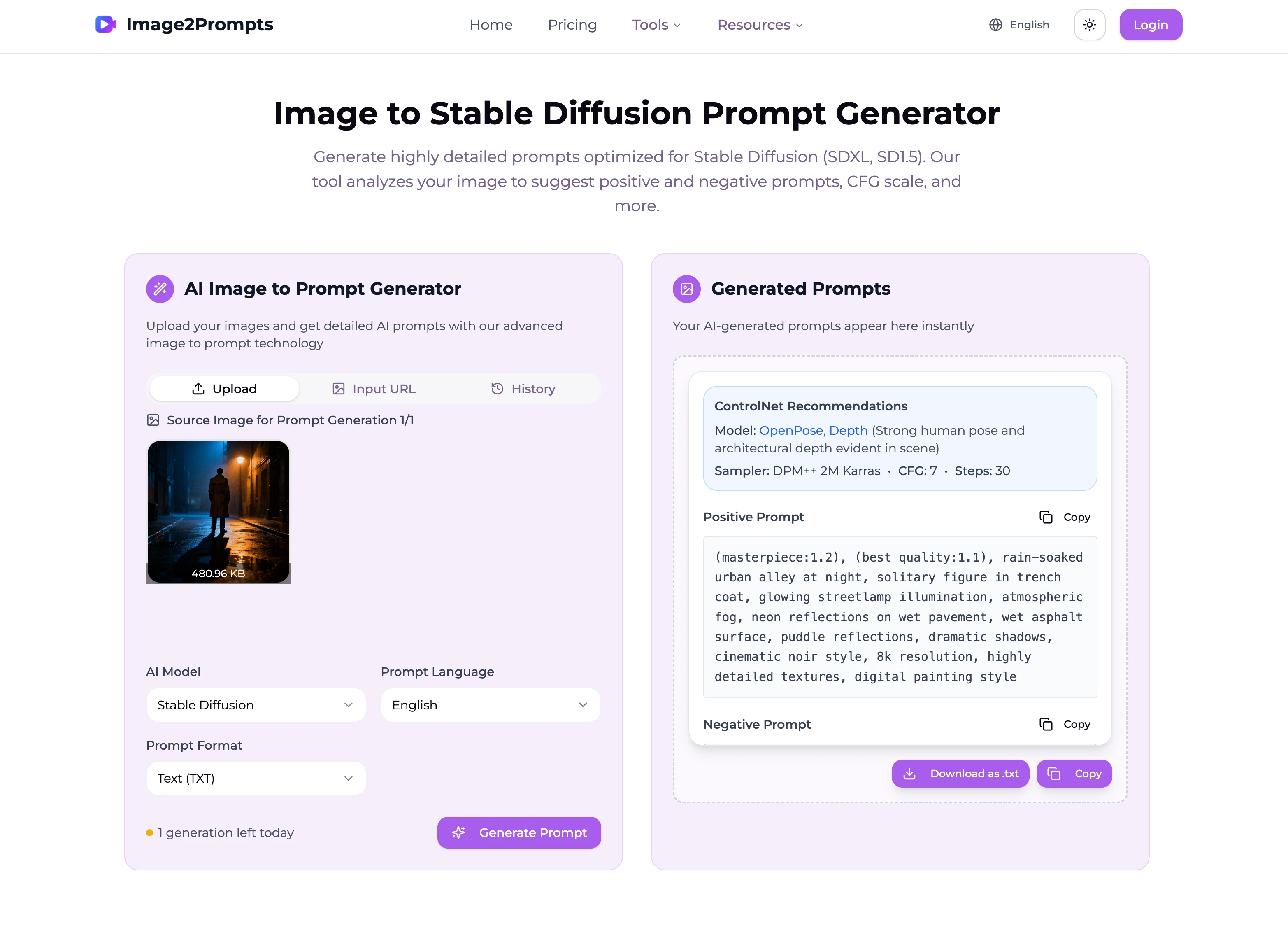
Prompts That Feel Like They Were Written by a Real Artist
This is where the tool shines for anyone steeped in Stable Diffusion workflows.
The positive prompts are long, structured, and deeply intentional. They’re full of cinematic detail but never fall into overwriting. You’ll see things like:
- “puddle reflections”
- “dim ambient glow”
- “35mm film grain”
- “dramatic chiaroscuro contrast”
- “ultra-detailed textures”
- “high dynamic range”
These aren’t just random aesthetic words—they’re the exact cues SD engines respond to. They shape the lighting model, sharpen the rendering quality, and guide the image’s mood.
And then, the tool goes a step further with ControlNet Recommendations. This may be my favorite part.
Seeing something like:
“Model: OpenPose, Depth (Human pose detected with clear depth information in foggy alley environment)”
“Sampler: DPM++ 2M Karras • CFG: 7 • Steps: 30”
It genuinely feels like the tool is giving you insider notes. It’s not just what to prompt, but how to set up your generation pipeline.
These hints can save you hours of trial and error—no exaggeration.
Negative Prompts That Actually Do the Heavy Lifting
Anyone who’s spent time fine-tuning SD outputs knows the truth:
Negative prompts are half the magic.
Most generators treat negatives as optional, but the image2prompts SD page treats them as first-class citizens. It produces long, robust lists that eliminate common issues like:
- Distorted anatomy
- Overexposed white patches
- Blurry textures
- Extra limbs
- Noisy shadows
- Deformed reflections
- Unwanted artistic artifacts
This kind of negative prompting isn’t decorative—it’s essential. And having it automatically generated saves a ridiculous amount of time, especially if you’re working on photorealism or film-style compositions.
Feels Like an Assistant Who Knows SD Inside Out
One thing I didn’t expect was the feeling of using this page. After a few generations, it genuinely started to feel like I had a small creative assistant beside me—someone who understood the rules and eccentricities of Stable Diffusion better than most humans.
Instead of:
“Here’s what your image looks like.”
It’s more like:
“Here’s the high-fidelity, lighting-aware, reproduction-ready prompt that SD actually wants—oh, and here are the ideal ControlNet and sampler settings too.”
The difference is subtle but profound. It gives you the sense that your image analysis is being handled by something that speaks the same visual grammar you do when crafting art through SD.
A Tool for Artists Who Want to Reverse Engineer Great Images
For me, one of the most exciting uses of this generator is creative reverse engineering.
We often stumble upon beautiful images—photography, movie stills, artwork—and think: “How can I recreate this style in Stable Diffusion?”
This tool solves that problem elegantly:
- Upload the image.
- Extract a detailed, SD-friendly prompt.
- Use the resulting phrasing and structure as inspiration for your own work.
- Adjust keywords to shift mood, lighting, or camera style.
In a world where so many SD tutorials are vague or overly technical, this feels like a shortcut into the minds of great creators.
Why This Page Feels Like a Big Step Forward
After spending time with it, I realized what makes this page feel so different:
It doesn’t just generate prompts. It teaches you how to think in Stable Diffusion language.
And once you start reading the outputs, something shifts in your own prompting style. You begin noticing:
- How lighting should be described
- How depth cues should be structured
- How film aesthetics should be layered
- How positive and negative prompts balance one another
The generator slowly nudges you toward becoming a better SD artist without explicitly trying to “teach” you anything. It’s learning by osmosis, and it’s surprisingly enjoyable.
If You’re Serious About Stable Diffusion, This Is Worth Bookmarking
Whether you’re a digital artist, a photographer trying to experiment with AI, a prompt engineer, or simply someone who loves the expression power of SD, this page is genuinely worth adding to your toolkit.
I’ve tested dozens of prompt extractors over the years, and most of them are good at “describing” but bad at “engineering.”
This one finally bridges that gap.
It offers the clarity of a technician, the eye of a cinematographer, and the flow of a seasoned SD pro. And somehow it does it all without getting in your way or drowning you in jargon.
If you want to try it yourself, you can explore the page here:
👉 Stable Diffusion Prompt Generator
As someone who spends far too many nights tweaking prompts to perfection, I can honestly say: This is one of the most useful additions to my SD workflow in a long time.
关于作者

Emily Watson
Content Strategist
Content strategist and AI enthusiast. Helps businesses leverage AI tools for content creation and brand storytelling.